

iOS
Android
Enrolling in second Luscii program
You can be enrolled in multiple health programmes at the same time, all accessible through one login.
You can log in once (with your email or username) and see all their programmes in one place.
How does it work?
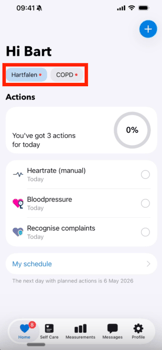
- Home Screen - The app shows tabs for each programme you are enrolled in. You can switch between programmes to see the relevant tasks/actions for each one.
- Messaging - Each programme gets its own inbox. Messages stay separate — you only see a programme's messages when you tap into that inbox.
- Actions (+ button) - Extra actions are grouped by programme
- Notifications - Changing notification preferences applies to all programmes at once.
- Absence - You can set time away either for all or individual programmes separately.
Contact support@luscii.com if you run into any issues.
Enrolling in second Luscii program
You can be enrolled in multiple health programmes at the same time, all accessible through one login.
You can log in once (with your email or username) and see all their programmes in one place.
How does it work?
- Home Screen - The app shows tabs for each programme you are enrolled in. You can switch between programmes to see the relevant tasks/actions for each one.
- Messaging - Each programme gets its own inbox. Messages stay separate — you only see a programme's messages when you tap into that inbox.
- Actions (+ button) - Extra actions are grouped by programme
- Notifications - Changing notification preferences applies to all programmes at once.
- Absence - You can set time away either for all or individual programmes separately.
Contact support@luscii.com if you run into any issues.